ImPOS Order screen
The kitchen and bar see every order the moment it’s sent
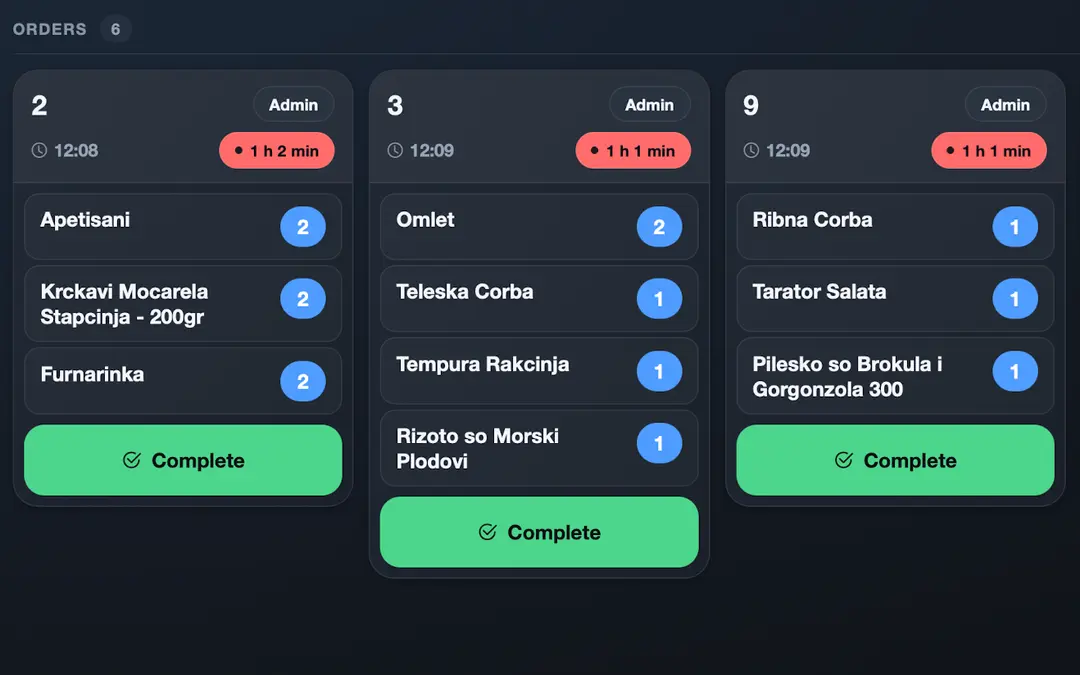
ImPOS, the POS software for restaurants, cafés and bars in North Macedonia, sends every order from the till or a waiter’s tablet to the kitchen and bar at once. On the Order screen each station sees when an order was placed and how long it has waited, and taps Complete when it’s ready. Tickets print at the kitchen, bar and pizza printers too.
How it works
-
Take the order
At the till or on a tablet, add the dishes to the table, with their options, extras and a comment for the kitchen if needed.
-
Send it
The order appears on the Order screen and prints at the station’s printer: kitchen, bar or pizza.
-
Complete it
The kitchen and bar see when each order was placed and how many minutes it has waited, and tap Complete when it’s ready.
What you get
- Every order on one screen, for the kitchen and for the bar
- When each order was placed, how many minutes it has waited, and when it was completed
- Staff mark orders done as they go, so fewer tickets get lost or forgotten
- Order tickets at the kitchen, bar and pizza printers, and a control printer for a copy
- Options such as “No onions” and priced extras, printed under their dish and shown on the Order screen
- A comment for the kitchen per order or per product; ImPOS can ask for one before an order with food is sent
- Portions, so dishes go out in courses
- Each category’s rows in its own colour on kitchen and bar tickets
- Order types In house, Pickup and Delivery, each in its own colour on the Order screen, with the Delivery module
- ImPOS Kiosk orders arrive like a waiter’s, marked “KIOSK #042”
What it doesn’t do
- No alert on the waiter’s phone when an order is ready.
- No orders from Wolt or Glovo: delivery orders are taken in ImPOS.
- Each station needs a printer, or a tablet or computer running ImPOS for the Order screen.
Kitchen and Order screen: questions and answers
What is the ImPOS Order screen?
It’s the kitchen and bar screen of ImPOS, the POS software for restaurants, cafés and bars in North Macedonia. It shows every order the moment it’s sent, with when it was placed and how long it has waited, and the station taps Complete when it’s ready.
Do I need a kitchen printer, a screen, or both?
Either works. Orders can print at the kitchen, bar and pizza printers, show on the Order screen on a tablet or computer, or both.
Does the kitchen see notes like “no onions”?
Yes. Options such as “No onions” print on the ticket and show on the Order screen, and a comment per order or per product prints on the ticket.
Can dishes go out in courses?
Yes. The portion separator splits an order into portions, so dishes go out in courses.
Does the kitchen see how long an order has waited?
Yes. Each order shows when it was placed and how many minutes it has waited, and afterwards when it was completed.
Do kiosk and delivery orders reach the kitchen too?
Yes. ImPOS Kiosk orders arrive like a waiter’s, marked “KIOSK #042”, and with the Delivery module each order shows its type (In house, Pickup or Delivery) in its own colour.
Does the Order screen work without internet?
Yes. The ImPOS server runs on your venue’s own network, so orders keep reaching the kitchen and bar when the internet is down.
How much does the Order screen cost?
ImPOS plans are yearly, from 12.000 MKD (Pro) to 32.000 MKD (Ultra). The Order screen is in the Ultra plan; ask us to add it to yours. Kitchen, bar and pizza printers come with every plan.
Show us your venue — we'll draw it for you in ImPOS.
A short demo, at your venue or online.