
ImPOS for restaurants
POS for restaurants, from the booking to the fiscal day
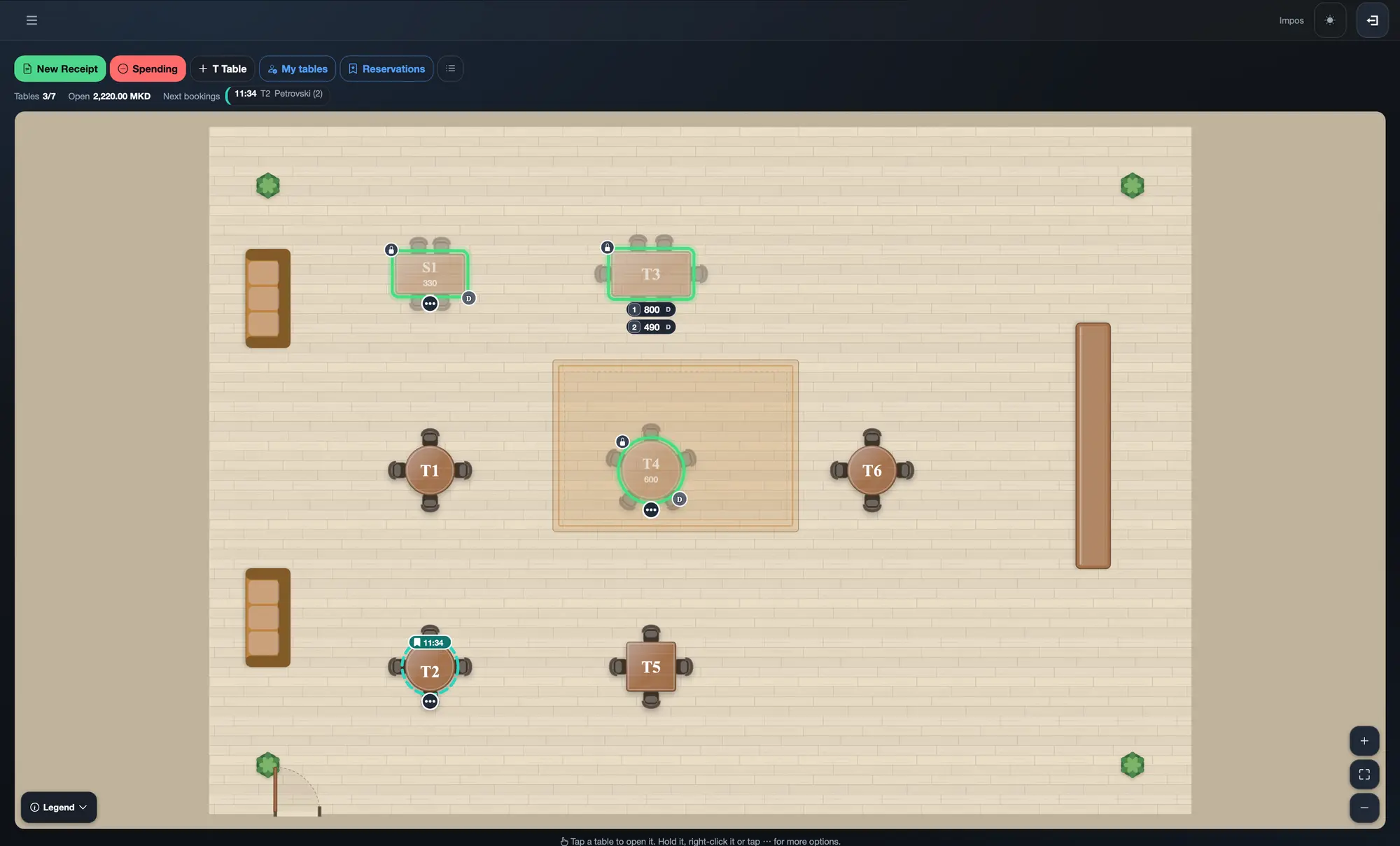
ImPOS is POS software for restaurants in North Macedonia: reservations on a floor plan of your dining room, orders from waiters’ phones to the kitchen in courses, bills split at the table and every receipt fiscalized on your fiscal printer. Restaurants, pizzerias and kebap houses across the country run their service on it.
A shift at a restaurant, step by step
-
Open the day
Each waiter signs in with their PIN and finds their tables under “My tables”; the next bookings show above the floor plan.
-
Seat the guests
Tap a reserved table to seat the booking, or open a free one for a walk-in.
-
Take the order
On a phone or tablet, with options such as “No onions”, extras and a comment for the kitchen; the portion separator sends the dishes out in courses.
-
Cook and serve
The kitchen sees each order on the Order screen or its printer, with the minutes it has waited, and taps Complete.
-
Pay and close
Split the receipt or move an order, take cash or card and fiscalize; at the end, End Shift and Close Fiscal Day.
Which ImPOS features a restaurant uses
| ImPOS feature | What it does here |
|---|---|
| Floor plan & reservations | Your dining room and terrace drawn to scale, with reservations and the heatmap of the busiest tables |
| Waiter app on phones | Waiters take the order at the table on their Android or iOS phone |
| Kitchen & order screen | Dishes reach the kitchen at once, with options and comments, and go out in courses |
| Stock & recipes | Each dish’s recipe (normativ) takes its ingredients off stock as you sell |
| Staff, roles & shifts | Each waiter’s PIN, tables and shift; who may cancel a receipt |
| Fiscal printer & КДФИ-01 | Every receipt fiscalized; the КДФИ-01 book filled in from them |
| Invoices & delivery notes | Invoices and delivery notes for company clients, and what each one owes |
| Dashboard & reports | Revenue by day, hour and shift, the top dishes and the average table time |
Guides: The fiscal printer rules, article by article All ImPOS guides
13 restaurants, pizzerias and fast-food places on ImPOS
ImPOS for restaurants: questions and answers
What is ImPOS for restaurants?
ImPOS is POS software for restaurants in North Macedonia. It runs the floor plan and reservations, sends orders to the kitchen, splits bills and fiscalizes every receipt on a fiscal printer.
Can the kitchen send dishes out in courses?
Yes. The waiter adds a portion separator to the order, so the kitchen sends the dishes out in courses.
Can guests split the bill?
Yes. One table can hold several orders: split the receipt, merge orders or move them to another table.
Can my staff take reservations in ImPOS?
Yes. Book a table for a time and a name; reserved and late tables show on the floor plan, and the day’s bookings are in one list.
Does the kitchen need a screen?
No. Orders can print at the kitchen printer, show on the Order screen on a tablet or computer, or both.
Can I keep track of ingredients?
Yes. Each dish’s recipe (normativ) takes its ingredients off stock as you sell, goods received add to it, and every item keeps its average cost.
What happens when the internet goes down during service?
Service goes on. The ImPOS server runs on the restaurant’s own network, so tables, orders and the kitchen keep working.
How much does ImPOS cost for a restaurant?
ImPOS plans are yearly, from 12.000 MKD (Pro) to 32.000 MKD (Ultra). The floor plan and the Order screen come with Ultra; Reservations come with every plan. Book a demo on WhatsApp to see which plan fits your restaurant.
Show us your venue — we'll draw it for you in ImPOS.
A short demo, at your venue or online.