ImPOS Dashboard and Reports
See what sells, when, and in which shift
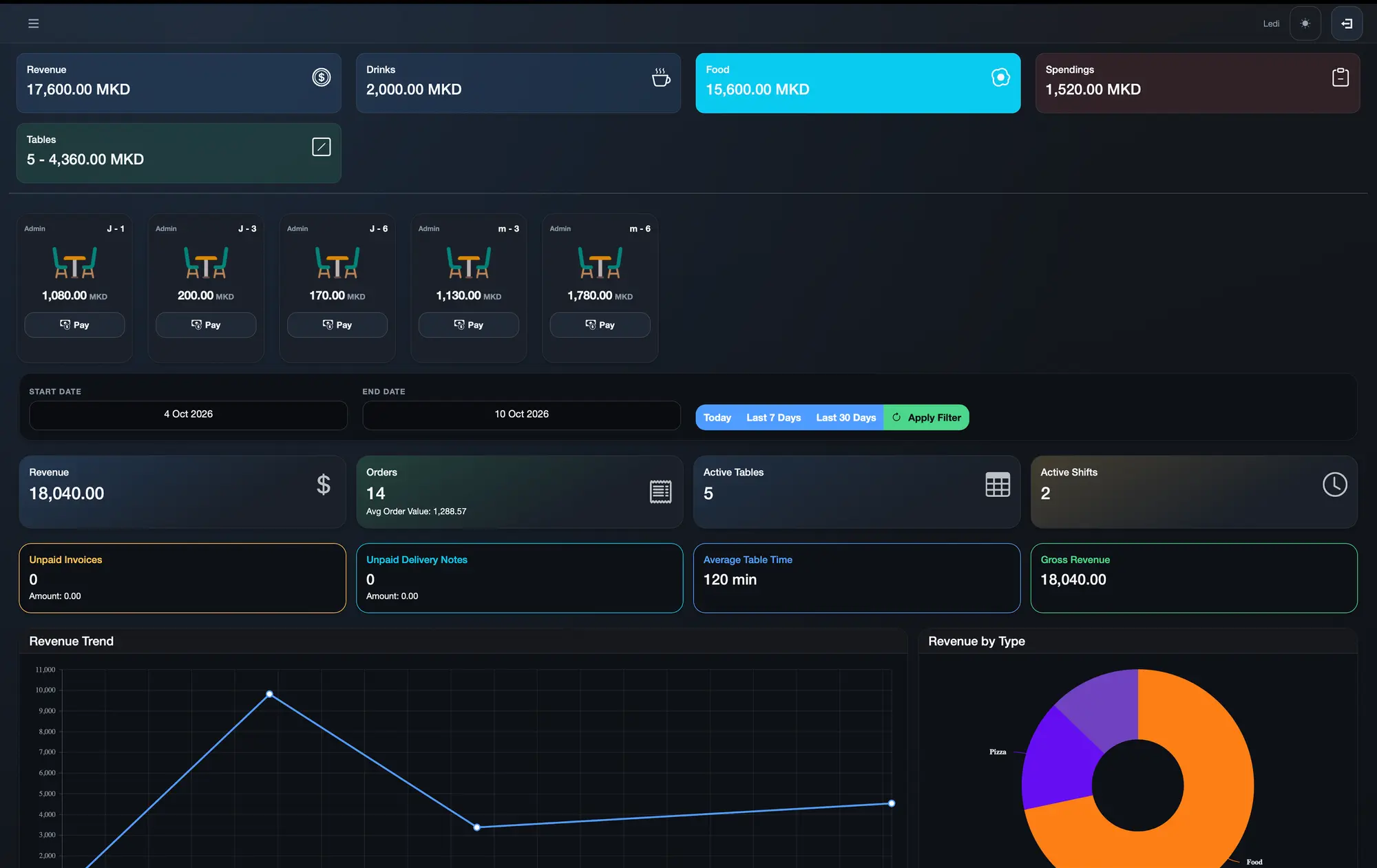
ImPOS, the POS software for restaurants, cafés and bars in North Macedonia, turns every receipt into numbers. The Dashboard shows revenue by day, hour and shift, payment methods and top products, and the Reports page adds analytics, charts and sales per product for any period. Through ImPOS cloud you can check them from outside the venue.
How it works
-
Sell as usual
Every receipt, payment and shift is recorded as staff work.
-
Pick the period
Today, Yesterday, Last 7 days, Last 30 days, or your own dates.
-
Read or print
Open the Dashboard or Reports, or print a report by date and the products sold.
What you get
- The Dashboard: revenue by day and by category, sales by hour and revenue by shift
- Payment methods: how much came in cash and how much by card
- Top products by quantity and by revenue
- Average table time
- Analytics and Charts across any period
- Product sales, Product analytics and Employee analytics
- Top-selling drinks, food and pizza
- Receipt history with filters
- A report by date and the products sold, printed on the report printer
- The stock value report, with Inventory
- Who sees the Dashboard and Reports, and which dates, set per role
What it doesn’t do
- No bookkeeping: ImPOS doesn’t keep a ledger or prepare tax returns.
- No revenue split by order type (In house, Pickup, Delivery).
- Checking the numbers from outside the venue needs internet; inside it, reports work without it.
Dashboard and reports: questions and answers
What reports does ImPOS have?
ImPOS, the POS software for restaurants, cafés and bars in North Macedonia, has a Dashboard with revenue by day, hour and shift, payment methods and top products, and a Reports page with analytics, charts and sales per product for any period.
Can I see my sales from home?
Yes. Remote access via ImPOS cloud is in every plan, so you can open ImPOS and its Dashboard from outside the venue.
Can I see my top-selling products?
Yes. Top products are listed by quantity and by revenue, and Product sales shows every product for the period you pick.
Can I compare shifts?
Yes. The Dashboard shows revenue by shift, and every shift closes with its own shift report.
Can I choose who sees the numbers?
Yes. The Dashboard, Reports and seeing any dates are separate permissions, so you decide per role who sees what.
Can I print a report?
Yes. Print a report by date, or the products sold, on the report printer.
Does ImPOS replace my accountant?
No. ImPOS gives you the sales, the payments and the КДФИ-01 book, but it doesn’t keep the books or file tax returns.
Are reports included in every plan?
No. Reports, with analytics, charts and product sales, are in the Pro and Ultra plans; ask us to add them to Platinum. The Dashboard and the shift reports come with every plan.
Show us your venue — we'll draw it for you in ImPOS.
A short demo, at your venue or online.